WebView App Development: A Smart Solution for Turning Websites into Mobile Apps
With the continuous growth in smartphone usage, having a mobile application has become an important way for companies and businesses to reach customers and provide their services faster and more conveniently.
However, not every business needs to build a complete mobile application from scratch, especially if it already has a fully functional, mobile-friendly website.
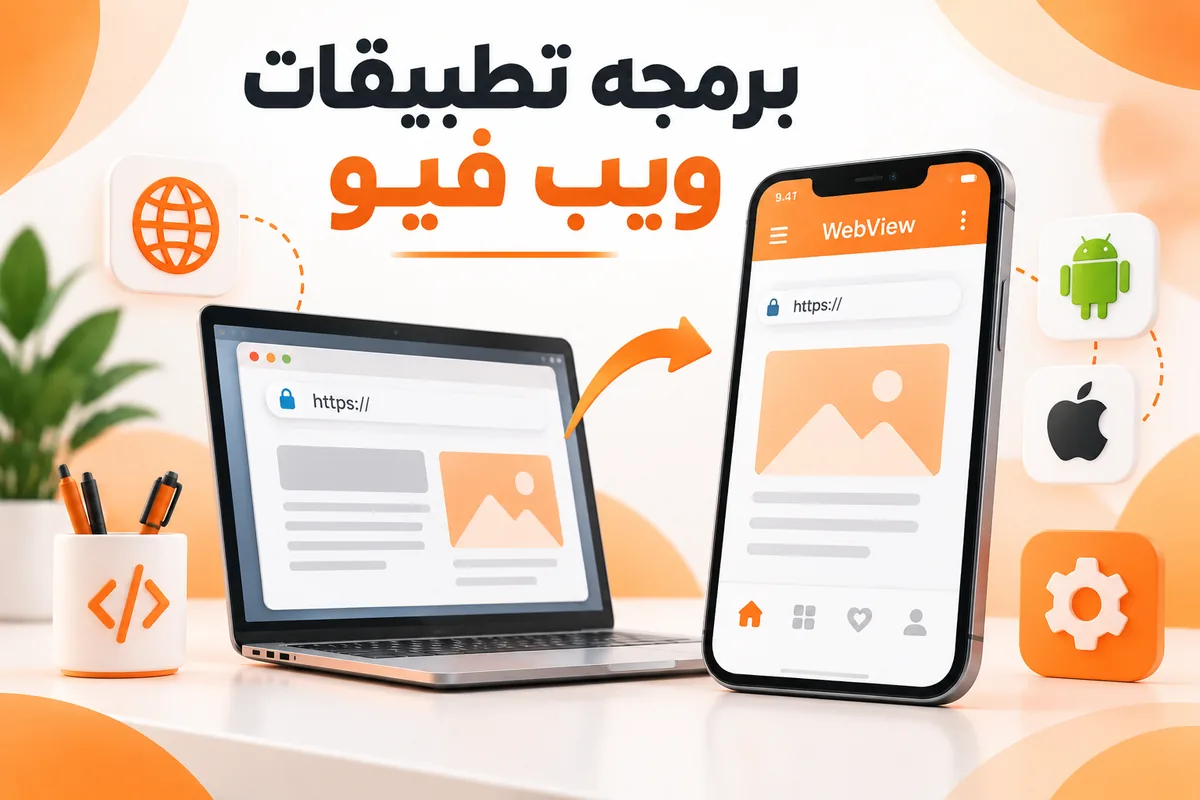
This is where WebView app development becomes useful. WebView technology allows a website to be displayed inside a mobile application, with the option to add features that make the user experience closer to that of a native app.
What Are WebView Apps?
A WebView app is a mobile application that contains an internal browser-like component used to display website content directly inside the app.
Instead of opening a browser and entering the website URL, users can access the website by simply tapping the application icon on their smartphone.
The concept is based on using a WebView component to display web pages inside an application developed for a specific operating system, such as Android or iOS, depending on the project requirements.
This approach is particularly suitable for companies that already have a complete website and want to provide users with a mobile app without rebuilding all website functionality from scratch.
The WebView app development process usually begins by ensuring that the website is fully optimized for smartphones and tablets.
After that, a mobile application containing a WebView component is created and connected to the website URL so that the website pages can be loaded directly inside the application.
However, a professional WebView app should offer more than simply opening a website.
It can include features such as a loading screen, custom app icon, push notifications, customized error pages, link management, and access to certain device capabilities depending on the requirements of the project.
This provides users with a more organized experience compared with simply accessing the website through a mobile browser.
Benefits of WebView App Development
1. Saving Time and Development Costs
One of the main advantages of WebView development is that it can reduce development time and costs compared with building a complete mobile application from scratch.
This is particularly useful when a company already has a website that includes most of the required functionality.
Instead of rebuilding the entire system for mobile devices, the existing website infrastructure can be used and connected to a mobile application.
2. Making Use of Your Existing Website
If you already have a website that works well and is mobile-friendly, a WebView application allows you to make use of the content and services that are already available.
In many cases, this also makes content updates easier because changes made to the website can automatically appear inside the application without requiring the entire app to be rebuilt.
3. Easier Access for Customers
Having an application installed on the customer’s phone makes it easier to access the company’s services.
Users can simply tap the app icon and access the website and its services directly instead of searching for the website link every time.
4. Push Notification Support
A WebView application can be developed to work with push notification services.
This allows businesses to send alerts and updates to customers regarding offers, news, orders, important announcements, and other relevant information, depending on the application requirements and capabilities.
5. Mobile-Friendly Interface Design
The user experience can be improved by ensuring that the website uses responsive design so that pages automatically adapt to different screen sizes.
This is extremely important because the success of a WebView application does not depend on the app alone.
It also depends on the quality of the website, its loading speed, and how easy it is to use on mobile devices.
Is WebView Suitable for Every Website?
Not necessarily.
The success of a WebView application depends largely on the quality and structure of the website itself.
If the website is fast, responsive, mobile-friendly, and provides a good User Experience, WebView can be a practical and effective solution.
However, if the website is not optimized for mobile devices, uses an outdated design, or suffers from performance problems, converting it into a WebView application will not automatically solve these issues.
The same problems may simply appear inside the mobile application.
For this reason, it is recommended to review and optimize the website before starting WebView app development.
The Difference Between WebView and Native Apps
There is an important difference between a WebView application and a native application.
A native app is developed specifically for a particular operating system and can make extensive use of device capabilities such as the camera, GPS, Bluetooth, push notifications, and other smartphone features, depending on the technologies used and the requirements of the application.
A WebView application, on the other hand, relies heavily on the website content displayed inside the app.
Therefore, WebView is usually suitable when the main objective is to provide access to an existing website through a mobile application.
Native applications may be more suitable for projects that require advanced functionality and extensive interaction with smartphone hardware and operating system features.
WebView App Development Process
WebView application development usually involves several stages.
The process begins by understanding the nature of the website and identifying the functions required from the mobile application.
The website is then reviewed to make sure that it works properly on smartphones and different screen sizes.
After that, the appropriate development technology is selected and the basic application interface is created.
The app is then connected to the website, and the required features are added, such as:
-
Splash screen
-
Custom application icon
-
Push notifications
-
Link management
-
Offline or connection error handling
Additional features can also be included depending on the project’s needs.
The application is then tested on different devices and screen sizes to make sure that it performs correctly.
Finally, the app is prepared for publishing on the relevant app stores according to their technical requirements and policies.
Performance and Security in WebView Apps
One common mistake is assuming that creating a WebView application simply means opening a website inside an app.
A professional WebView application requires careful attention to performance, security, and User Experience.
The website should use a secure HTTPS connection, user data should be properly protected, and the website should be regularly updated.
Page loading speed should also be optimized.
External links, file downloads, login processes, and other interactions should be handled properly so that the user does not feel as though they are simply browsing a normal website inside a mobile browser.
When Should You Choose WebView for Your Project?
WebView can be considered when a company or organization already has a complete, mobile-friendly website and wants to provide users with a mobile application in a faster and more cost-effective way than rebuilding the entire system from scratch.
It can be a suitable solution for many types of projects, including:
-
Service websites
-
E-commerce stores
-
Booking platforms
-
Content platforms
-
Web-based services
However, projects that require extremely high performance or advanced functionality that depends heavily on smartphone capabilities may need to consider other solutions, such as native applications or hybrid applications.
Why Do You Need a Specialized WebView App Development Company?
Choosing a specialized development company can help transform your website into a mobile application in a more professional way while taking design, performance, security, and device compatibility into consideration.
An experienced development company can also review the website before development begins and determine whether WebView technology is suitable for the project.
The development team can identify which additional features should be integrated into the application and recommend the most suitable implementation approach.
A specialized company can also perform the necessary tests, prepare the application for publication, and provide ongoing updates and future development.
Conclusion
WebView app development has become a practical solution for companies that already have websites and want to reach users through a mobile application without rebuilding the entire project from scratch.
This technology offers flexibility, faster development, and reduced development costs in suitable use cases, while also allowing businesses to add features that improve the overall User Experience.
However, choosing WebView should depend on the nature of the project, the quality of the existing website, and the required application features.
For this reason, it is important to evaluate the project’s needs first and choose the most appropriate technical solution rather than relying on a single technology for every type of mobile application.
If you already have a website and are considering converting it into a mobile application, exploring the possibility of developing a professional WebView app may be an effective step toward expanding your digital presence and making it easier for customers to access your services.